

Yealink: Building Smarter Hybrid Meeting Spaces

Hybrid collaboration has evolved far beyond basic webcams and speakerphones. Today’s organizations need intelligent meeting technology that delivers immersive video, crystal-clear audio, seamless content sharing, and simplified room management. That’s where the Yealink MeetingBar A40, Yealink MeetingBoard Pro, and Yealink MTower come in.
Together, these Yealink solutions are designed to modernize conference rooms, boardrooms, classrooms, and hybrid collaboration spaces with AI-powered video conferencing and intuitive meeting experiences.
Why Businesses Are Upgrading Their Meeting Rooms
Organizations across North America are investing in smarter collaboration technology because hybrid work is now permanent. Teams need solutions that support:
Microsoft Teams Rooms and Zoom Rooms
BYOD (Bring Your Own Device) workflows
AI-powered speaker tracking
Intelligent framing and meeting equity
Wireless collaboration
Simplified room deployment and management
Yealink has become a major player in this space by delivering scalable, Android-based meeting room systems that combine video, audio, compute, and collaboration tools into streamlined solutions.

Yealink MeetingBar A40: AI-Powered Video Collaboration for Small and Medium Rooms
The Yealink MeetingBar A40 is an all-in-one video collaboration bar built specifically for premium small-to-medium meeting spaces.
Unlike traditional room systems that require separate PCs, DSPs, cameras, and microphones, the A40 consolidates everything into a single appliance. This dramatically simplifies installation, cable management, and ongoing support.
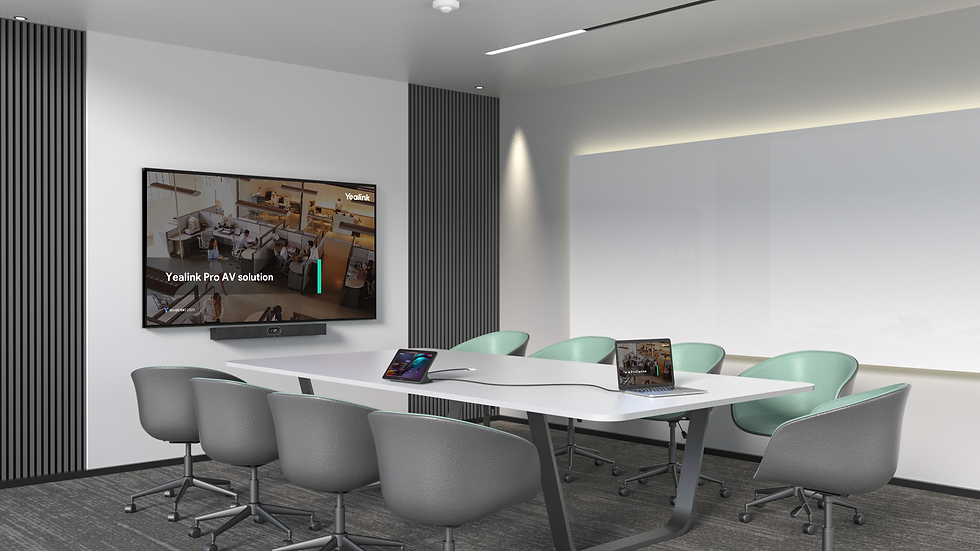
Key Features of the Yealink MeetingBar A40
Dual 48MP AI Cameras
The A40 uses dual 48MP cameras to create a 120° field of view while maintaining sharp image quality across the room. Yealink’s AI-powered IntelliFocus and auto-framing technology automatically highlights active speakers and keeps participants properly framed during meetings.
Advanced Audio Performance
The MeetingBar A40 includes:
8 MEMS microphone array
AI noise cancellation
Reverberation suppression
Full-duplex audio
Integrated stereo speakers
The system supports audio pickup ranges up to 6 meters and can also integrate with expansion microphones for larger rooms.
One-Cable Deployment
One of the strongest advantages of the A40 is its simplified deployment architecture. A single Cat5e cable can provide both power and network connectivity between the bar and touch console, significantly reducing installation complexity.
Microsoft Teams Rooms and Zoom Rooms Support
The MeetingBar A40 supports:
Microsoft Teams Rooms on Android
Zoom Rooms
BYOD USB mode
Multi-platform room deployments
Because it is built on Android 13 and supports Microsoft’s Device Ecosystem Platform (MDEP), the A40 is designed for secure, future-ready meeting environments.
Best Use Cases for the MeetingBar A40
The A40 is ideal for:
Huddle rooms
Medium-sized conference rooms
Executive offices
Small training spaces
Hybrid meeting environments
For organizations looking to standardize collaboration technology across multiple smaller rooms, the A40 offers an excellent balance of performance, scalability, and simplicity.

Yealink MeetingBoard Pro: The All-in-One Interactive Collaboration Display
The Yealink MeetingBoard Pro combines a large-format interactive touchscreen, AI-powered video conferencing system, digital whiteboarding platform, and collaboration hub into a single device.
For businesses focused on collaboration-heavy workflows, the MeetingBoard Pro can eliminate the need for separate displays, cameras, and whiteboarding systems.

Key Features of the MeetingBoard Pro
Interactive 4K Touch Display
The MeetingBoard Pro is available in multiple display sizes and delivers:
4K UHD resolution
Multi-touch collaboration
Digital annotation
Wireless content sharing
Interactive whiteboarding
This makes it particularly valuable for brainstorming sessions, workshops, training rooms, and collaborative design meetings.
Native Microsoft Teams Rooms Experience
The platform integrates directly with Microsoft Teams Rooms, creating a seamless meeting experience for organizations already invested in the Microsoft ecosystem.
AI Camera and Audio Technology
Like the MeetingBar series, the MeetingBoard Pro includes intelligent camera tracking, auto-framing, and noise suppression technologies that help remote participants stay engaged.
Flexible Collaboration Workflows
The MeetingBoard Pro supports:
Wireless presentation
Interactive whiteboarding
Teams collaboration
BYOD meeting modes
Hybrid brainstorming sessions

Yealink MTower: Creating True Front-and-Center Meeting Equity
The Yealink MTower is one of Yealink’s most innovative hybrid meeting accessories.
Rather than relying solely on front-of-room cameras, the MTower sits at the center of the conference table and creates a more immersive, face-to-face experience for remote participants.

What Makes the MTower Different?
322° Multi-Camera Coverage
The MTower combines three 4K cameras:
One telephoto lens
Two ultra-wide-angle side cameras
This creates a 322° field of view that captures participants around the table with far greater visibility than traditional front-facing systems.
AI Best-View Switching
The MTower uses AI-powered switching between front and center perspectives to create a more natural meeting experience for remote attendees.
360° Audio Pickup
The built-in microphone system provides 360° audio pickup with AI noise reduction and voice capture ranges up to 6 meters.
Best Applications for MTower
The MTower is especially valuable in:
Boardrooms
Executive conference rooms
Large meeting tables
Hybrid leadership meetings
Client-facing collaboration spaces
When paired with the MeetingBar A40 or other Yealink room systems, the MTower helps create a more immersive and equitable hybrid meeting experience.
Final Thoughts
The modern workplace demands more than basic video conferencing. Organizations now need intelligent collaboration ecosystems that improve engagement, simplify room technology, and create equitable experiences for remote participants.
The Yealink MeetingBar A40 delivers streamlined video conferencing for everyday meeting rooms. The MeetingBoard Pro expands collaboration with interactive touch and whiteboarding capabilities. The MTower enhances meeting equity with immersive center-view camera technology.
For businesses planning conference room upgrades, Microsoft Teams Room deployments, or hybrid workplace modernization initiatives, these Yealink solutions represent some of the most advanced collaboration technologies currently available.
About Matrix Video Communications Corp.
Connecting Canada for over 32 years. With 11 offices across the country, we’re ready to help you turn your vision of your space into a spectacular reality. Reach out to us today at sales@mvcc.ca for a free consultation and site visit.


Jessy Janitorial Services Ltd. is a trusted Commercial Cleaning Company Edmonton businesses rely on for clean, healthy, and professional workplaces. Since 1994, the company has served offices, retail stores, industrial sites, medical clinics, and other commercial properties with dependable cleaning solutions. Services include office care, desk and breakroom sanitizing, restroom cleaning, post-construction cleanup, carpet care, hard-floor maintenance, and specialized industry cleaning. Flexible plans are available for nightly, weekly, or monthly service, helping businesses choose only what they need. Jessy Janitorial also serves St. Albert, Sherwood Park, Spruce Grove, and Nisku with affordable, consistent commercial cleaning support throughout the entire year.
The MeetingBar A40’s AI framing is a game-changer for huddle rooms, but the MTower’s ability to unify audio across a larger space is what really sells the "smarter" hybrid setup. I’ve been digging into how these stack up against traditional bar setups, and the room management angle alone is worth exploring further. https://free-ai-video.com
The AI-powered video and simplified room management really are the game-changers here—especially how the MeetingBar A40 and MTower work together to cut the cable clutter. I’ve been testing similar setups in our huddle rooms, and this is exactly the direction we need. Check out the full breakdown https://ai-video-maker.net
The A40’s AI framing and the MTower’s audio pickup really do close the gap between in-room and remote participants—curious how the MeetingBoard Pro handles whiteboard sharing in a mixed setup. I’ve been testing similar gear lately, so check out my notes on https://yeggi.pro
The shift to AI-powered room systems like the MeetingBar A40 really is the missing piece for making hybrid meetings feel less like a production and more like a conversation. Curious how the MTower handles the audio mixing in larger boardrooms compared to the A40’s built-in mics—I’ve been digging into the specs over at https://z-image-turbo.me